This is a guest post written by Isa about “The Ultimate Guide to Netflix for Parents“. I’m sure most of you will find this useful. If you would like to know more about Isa, please scroll down to the bottom of this post where you can find her details, under “About the Author“.
Most of us either have our own Netflix or are borrowing someone else’s. As a result, it’s a pretty big deal! Before getting started, I’d like to take a moment to thank Franca for featuring this post on her blog. If your kids are into Yo-kai Watch, you might want to check out her review of one of Hasbro’s new toys.
Netflix Ultimate Guide for Parents (Guest Post)
The power balance is shifting in televised entertainment. In a world where cable once reigned supreme, Netflix has virtually been crowned the next prince. With a vast array of TV series and movies, a broad audience has already started to shift away from the tradition of having “thousands of channels and nothing to watch”.
Of course, that also means your kids are going to be getting into Netflix, too. Fortunately, Netflix has made efforts to cater to parents’ needs; after all, not everything is appropriate for all ages.
Parental Controls
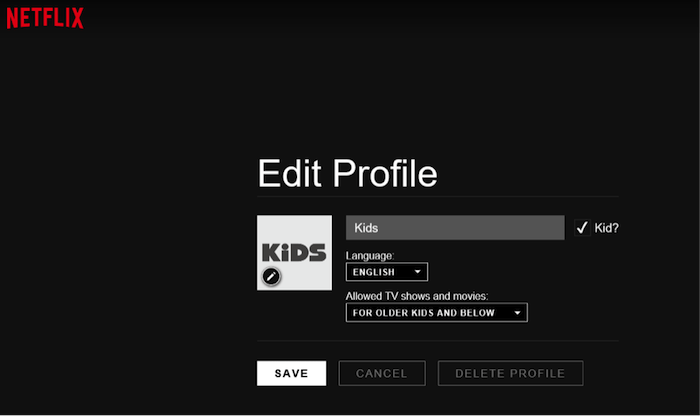
As with many services, parental controls let you choose what your kids can and cannot watch. But Netflix has done a little better by offering options that cater to different age groups of “kids.” It might seem a tad heavy-handed, but it’s very convenient.
We all know that children of different ages have wildly different interests. Kids 6-12 will want to watch differently than teenagers, as will kids in the 2-5 range. These options are helpful for both parties: you won’t need to worry that the kids are watching shows inappropriate for their age group, and they’ll also be able to find what they want to see more easily.
There were, however, some misgivings about the basics of the parental controls system. Once you’re logged in, it’s simple enough to log out of the “kids” account and go straight to the adult account (switching profiles is easy). As good as these settings are, they hardly qualify as the “ultimate” tool without their accompanying element.
To keep kids from changing the settings, you need to set a security PIN for parental controls. The option for those settings is under My Account, then Parental Controls. While not the most secure access code (it can only be four numbers), it’s enough to deter the less determined little rascals from accessing the wrong programs.
If you’re still concerned, you’ll need to get a bit more involved.
Monitoring Your Kids
As kids get older, they don’t appreciate being watched all the time. But while society is statistically safer than ever for kids (seriously, there aren’t going to be razor blades in the candy, we promise!), that doesn’t exempt us from needing to check in on them. Developing minds need someone to look around corners for them.
Fortunately, Netflix keeps a watch history of everything on your account profiles. Parental controls restrict content by age, but that doesn’t mean you’ll approve of absolutely everything they choose to watch. With the younger kids, that may not be an issue; you probably shouldn’t give them free rein over the tube anyway until they’re old enough to be more responsible.
For the teenagers, it’s different. They’re going to want that independence to do what they want; some teenagers will even go so far as to figure out your PIN so they can access shows without you knowing. Of course, a few of these teenagers remember that you can check your watch history.
Browse through the profiles now and then to check what they’ve been watching. If there’s something you don’t think is right, it may be time to talk about it. In the toughest case, you may need to change the account password and not leave it signed in. Responsibility and trust should be earned.
Accessing Foreign Content
Believe it or not, there are some superb films and programs available on Netflix—just not to you. Netflix restricts its content regionally, meaning shows might be available in Canada or the UK but not in the US; the opposite is also true. At the time I wrote this article, “Night at the Museum” was available in Canada but nowhere else.
Luckily, that problem can be solved with a Virtual Private Network (VPN). When you’re subscribed and connected via a VPN, Netflix thinks your location is the server you’ve selected (there are servers worldwide). Because of that, you can access Netflix content from other countries without actually being there.
But using a VPN isn’t something most of us know a lot about. If you’d like to learn more about setting up your own VPN, Secure Thoughts has a guide specifically for Netflix. It’s a good option if you need to travel out of the country or want access to additional content.
This is especially useful in regions with stricter internet controls. For instance, travellers can use a VPN for China to continue accessing their favourite shows while abroad.
Netflix’s Hidden Settings
Another thing you ought to know about Netflix is its secret menu. Either because the authors felt some users shouldn’t mess with all of the settings, or they’re just a fan of hidden settings, there actually are a few “special” settings you can’t usually access. That is, unless you know how.
Those settings primarily affect how Netflix loads your videos. If you’ve ever been on unstable or fluctuating internet, you’ve probably run into Netflix buffering videos (pausing to load, essentially). You can actually fix that setting by accessing the secret menu via one of three different methods:
• For PC users, Shift+Alt+Left Click (all at once)
• For Mac users, Shift+Option+Click
• For Game consoles, Up-up-down-down-left-right-left-right-up-up-up (also suitable for extra lives in Konami’s Contra…well, almost)
The hidden menu allows you to adjust how your account buffers. Without it, video quality will degrade when the internet speed drops, but the video will keep playing. It’s a good trick to know, especially if you and the kids decide to travel. Mom and Dad can be patient, but sometimes your toddler won’t be so forgiving.
Subtitles
Closed captioning or subtitles are something you might occasionally like to use on films if the volume levels vary too much or you’re watching films in foreign languages. It can also be a good way for younger kids to practice their reading. But we weren’t all born with perfect 20/20 vision either.
In the Your Account section of Netflix, you can adjust the size and colour of subtitles as they appear in your programs. It’s especially useful on the rare film where everything is very brightly coloured and your closed captions are in bright yellow.
Feel like we missed something on Netflix? Having trouble getting settings exactly the way you want? Leave us a comment below so we know!

Thanks for stopping by,
Love you all ❤️
Franca 💋
Linking up with:

I love NetFlix. I don’t have any reason to have any child safe features. However, I also wasn’t aware of all the different functions available on NF. I do use subtitles occasionally, so thank you for the advice. I’m sure this will be of great help to parents too.
Amanda. #kcacols
Oh fantastic tips! I didnt know about the parental controls, will be setting that up! #KCACOLS
We still haven’t got onto Netflix, but will on our return to our house – so good timing for me! #KCAKOLS
I’ll confess I’ve never even used Netflix!! Good advice though and good to know kids can be restricted on what they view #kcacols
We love Netflix and we use VPN to get access to US content, which is much more extensive. Mind you, last time I looked, The Good Wife was only available on UK Netflix and not US, which is weird as its a US show. Love the tips about secret menus. #KCACOLS
This is a really interesting post Franca, I need to access this secret menu. We have bad internet here in our house and Netflix always stops which is so annoying. It also reminds that I need to watch more NetFlix. Claire x #KCACOLS
Ohh I never knew about the vpn thing..definitely checking that out, I love netflix! Fab security tips too, will keep hem in mind for when Leo is bigger and learns how to use the remote!xx #KCACOLS
I don’t actually have Netflix, but this was so interesting and great to know what it’s all about. #KCACOLS
this is so useful Franca – although B is only 3 so we control Netflix at the mo but I know it wont be long before he will be doing it himself! #KCACOLS
Thanks so much Isa! Even though Big Munch is three years old, she knows her way around the remote control and I do worry that one day she will start watching something on Netflix she shouldn’t be! Really handy tips about the parent controls #KCACOLS
I LOVE netflix but didn’t know any of this! Very useful to know:) #KCACOLS
Great informative post, love netflix but didn’t know about the hidden settings! #KCACOLS
We tried Netflix a while back but didn’t find much we wanted to watch on it. We wanted to get rid o Sky because it was so expensive! But we’re now loyal(ish) to Sky!
It’s good to know Netflix has a child safe setting though #KCACOLS
Great tips, we use Netflix and have the kids menu set up for our boys but I didn’t know about the secret menu! Thanks. #kcacols
I know a lot of people who have Netflix. I will be letting them know about the secret menu #KCACOLS
Huge Netflix fans here, it’s the only thing that keeps me sane some days! I had no idea about the secret menu though! Thanks for sharing! #KCACOLS
Great post- I absolutely love Netflix and there are some great tips here! Right, i’m off to watch more boxsets 🙂 xx #KCACOLS
Good tips thanks – I don’t have Netflix, but interesting to hear more about it.
#KCACOLS
Great tips. We’ve just got into Netflix (late to it I know).
#KCACOLS
Netflix blocked VPN accessing the site recently though. I know I can’t get American Netflix anymore. Though I have star trek now so I’ll cope. #kcacols
Netflix is brilliant – we’ve watched some great stuff on there. I personally don’t find the restrictions ‘too heavy handed’ – it actually puts your mind at ease as to what the kids are watching! #KCACOLS
This was really interesting. I didn’t have a clue about most of the stuff in your article, despite my kids using Netflix a lot. Thanks for writing and linking #kcacols
Really informative, thank you! I didn’t know about the hidden settings and subtitles – really useful! Thank you X #KCACOLS
We haven’t had to use any of the parental control settings yet as out 5 yr old can’t put Netflix on by herself yet – definitely good to bear in mind for future though! 🙂 #KCACOLS
This is really useful. My two are still too young for me to worry about parental features but I’m glad I know about them now. We love Netflix! #KCACOLS